

Showing posts with label Texture. Show all posts
Showing posts with label Texture. Show all posts
Tuesday, August 28, 2012
The Colorful Alleys of Antigua
I couldn't get enough of the textures and colors in Antigua. It was like being a kid surrounded by chocolate at every turn. My buddies thought I was nuts taking photos of all these walls, doors and shop fronts...but I couldn't control myself....


Tuesday, August 14, 2012
No Texture Needed
I didn't add any textures to this photo, but this would be the type of wall where I would get up close and take a photo for a texture to use in other photos. This would be a good archaeology experiment...how many coats of different paint were used on this wall, and how many years separated each coat of paint?....scientists in years to come will be studying this wall...ha ha....

Monday, May 07, 2012
Guilin With Texture
I was messing with one of my photos from China this afternoon, and came up with this creation below. I started by converting to black n white, then wondered what it would look like with a bit of texture added. So, I added one, then another, then one more...messed with the different blend modes on each and opacity until I got what I liked...
I have one more day with the D800 then have to return it to my buddy, Edward. I will write my thoughts tomorrow...stay tuned!

I have one more day with the D800 then have to return it to my buddy, Edward. I will write my thoughts tomorrow...stay tuned!
Wednesday, March 07, 2012
Like A Painting
I have been working on a few images for an art auction next month. This is one of the images I have submitted...it is iconic Jakarta...the Bajai. I love the way the textures (I used 4 of them for this image) change the entire look to the photograph and turns it into more of a painting or work of art than a photograph. I printed this large on canvas, and I think it will look cool in someone's office...I hope, anyway.

Wednesday, February 29, 2012
A Rainy Night In Yangshuo
I really enjoy messing around with textures in my photos...really gets the creative juices flowing. I used three textures for this photo. The first texture I added had the cracks in it that I used across the mountains in the background, I then added some textures with some color and "texture" to add to the rest of the photo to get that "painted" feeling. I masked out the other two textures from the background as it ended up covering the mountains. I then grouped all of my layers into one group, and changed the blend mode to "screen" to brighten the entire photo, and changed the opacity of that layer so that it was not too bright, and masked out the areas that I didn't want affected. Sharpened a bit, and that is it...done. Took me about 20 minutes...

Thursday, February 16, 2012
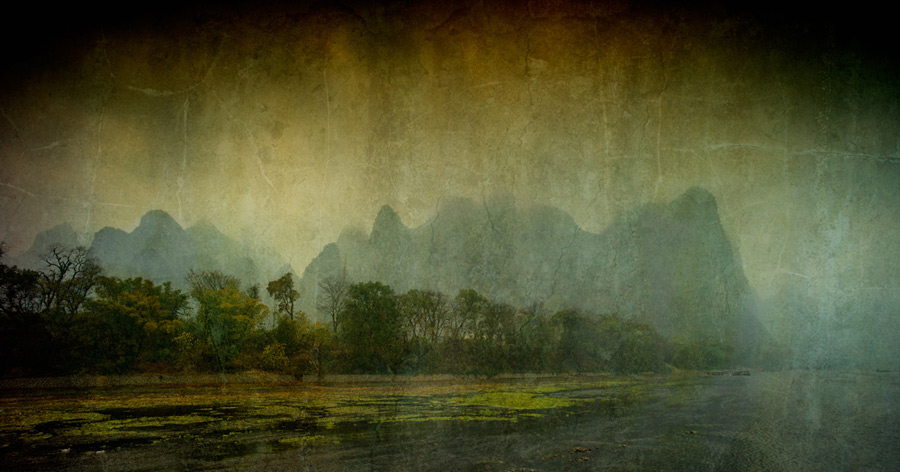
Along The Li River With Texture
Thanks for all the nice comments yesterday. I really am keen on changing what I do here on this blog, and make it more interesting to those who stop by here....and maybe eventually, I will get more traffic coming here as a bonus.
Hey, guess what? It is my birthday today! I turned the big FIVE-O...I guess I am now officially an old man...but sure don't feel like one...still feel like I am in my twenties!! Hope that lasts...hehe...
So...about this photo...
As you know, my trip to China was dampened (literally) by the foggy, rainy, cold weather. On our cruise down the Li River, we could barely see the hills. So, many of my photos had a lack of "light" in them (we didn't see the sun for 10 days), and the skies were pretty plain. This sets up the perfect opportunity to blend some textures into the photo to add some drama to an otherwise drab looking photograph. So how did I do that?
Step 1: When you are out walking around with your camera, take photos of interesting looking textures....I now have a collection of almost 300 textures...look for nice cracks, colors and other interesting textures...you can use these later to create. Warning: people might look at you in a strange way taking photos of walls, but just ignore them...
Step 2: Choose a texture to add to your photo. This is the creative part...do you want to add some color, some texture, some pattern, a special effect, some cracks? Different textures will do different things to your photo...you will be adding another layer to your photo, so just experiment...if it doesn't work, delete the layer and try another texture.
Step 3: Add the texture to your photo by creating a new layer. Use the free transform tool to re-size the texture so that it is the same size as your photograph.
Step 4: Change the blend mode of your texture. I like overlay, soft light or hard light, but give them all a try and see what you like best. You can then change the opacity of the layer.
Step 5: Use a mask to "paint out" what you don't want to show.
Step 6: Add some other textures on top, and then repeat steps 4 and 5.
The possibilities are infinite. You can also change your textures with some filters, change the colors of your textures, darken or lighten them...up to you. Experiment, and have fun!
For this photo, I added two textures....I used softlight as my blend mode for both, and I masked out the "cracks" in the mountains. After I was happy with the textures and masking, I softened the entire image by applying a slight gaussian blur to dull the textures. I then masked out the blur in the trees, and sharpened...but only sharpened the trees (used a mask on that as well).
Hope this helps....
Hey, guess what? It is my birthday today! I turned the big FIVE-O...I guess I am now officially an old man...but sure don't feel like one...still feel like I am in my twenties!! Hope that lasts...hehe...
So...about this photo...
As you know, my trip to China was dampened (literally) by the foggy, rainy, cold weather. On our cruise down the Li River, we could barely see the hills. So, many of my photos had a lack of "light" in them (we didn't see the sun for 10 days), and the skies were pretty plain. This sets up the perfect opportunity to blend some textures into the photo to add some drama to an otherwise drab looking photograph. So how did I do that?
Step 1: When you are out walking around with your camera, take photos of interesting looking textures....I now have a collection of almost 300 textures...look for nice cracks, colors and other interesting textures...you can use these later to create. Warning: people might look at you in a strange way taking photos of walls, but just ignore them...
Step 2: Choose a texture to add to your photo. This is the creative part...do you want to add some color, some texture, some pattern, a special effect, some cracks? Different textures will do different things to your photo...you will be adding another layer to your photo, so just experiment...if it doesn't work, delete the layer and try another texture.
Step 3: Add the texture to your photo by creating a new layer. Use the free transform tool to re-size the texture so that it is the same size as your photograph.
Step 4: Change the blend mode of your texture. I like overlay, soft light or hard light, but give them all a try and see what you like best. You can then change the opacity of the layer.
Step 5: Use a mask to "paint out" what you don't want to show.
Step 6: Add some other textures on top, and then repeat steps 4 and 5.
The possibilities are infinite. You can also change your textures with some filters, change the colors of your textures, darken or lighten them...up to you. Experiment, and have fun!
For this photo, I added two textures....I used softlight as my blend mode for both, and I masked out the "cracks" in the mountains. After I was happy with the textures and masking, I softened the entire image by applying a slight gaussian blur to dull the textures. I then masked out the blur in the trees, and sharpened...but only sharpened the trees (used a mask on that as well).
Hope this helps....
Tuesday, November 01, 2011
The Forbidden City Moat
I posted this photo on Google+ last week, and commented how I saw this scene and was reminded of a photo I saw on Trey Ratcliff's, Stuck in Customs Blog. I was wondering if it is cheating to take the same photo?? I remembered liking his shot, and when I saw the same scene, I wanted something similar. I am usually not like that...I like to find my own shots, but is it cheating in some way in taking the same photo that you have seen somewhere else?

Monday, October 10, 2011
Sundah Kelapa
This is the old harbor at Sunda Kelapa in Northern Jakarta. I really like this place as you can just imagine the old Spice Ships from the 17th century coming into this harbor to deliver their goods to the old Dutch town of Batavia...I am sure the docks have not changed much since those days...

Thursday, October 06, 2011
Boats At The Pier
If you ever have a photo where the sky is a boring white, add a texture to the photo, and it becomes much more interesting...

Wednesday, August 10, 2011

Wednesday, May 18, 2011
My Internet Was Down
Wow...this has been the longest stretch of time without a new photo...sorry about that. We had a major storm last week, and lightning hit the tower that connects me to the server...so, I had no access to the internet the past 5 days...I am up and running again, though...so have no fear.

Wednesday, May 04, 2011
Jakarta's Iconic Bajai
Panorama photos don't really come out too well on the web as I am restricted to 900 pixels, so this photo is only about 200 pixels tall. Having said that, this is a 5 shot pano of these famous iconic bajai's of Jakarta. The government is trying to rid of them as they do put out pollution and they are noisy...but, it would be sad to see them go...

Friday, April 22, 2011

Monday, March 21, 2011
A Visit To The Zoo
I took the kids to the zoo today, and gave myself a personal project....take some photos at the zoo, take some texture photos, and then combine them to make one piece of art...this is what I came up with. Gotta love the expression on the Orangutang's face...

Wednesday, March 09, 2011
The Village Homestay
We slept in these small bamboo huts...they were actually very comfortable, and sound of the stream trickling by at night is something that puts me right to sleep...

Friday, January 28, 2011
I Can't Think of a Title
I have trouble finding a title for photos...what would you call this? "Cool Hong Kong Building", "Tall Building", "Cool Architecture"...I am stuck...in any case, it is a cool, tall, architectural masterpiece in Hong Kong...what will architects come up with next?
I did use a single texture for the sky which was just a plain old white sky in the original which sucked all life and color from the photograph. I don't like white skies and will avoid them at all costs...
Have a great weekend!!
I did use a single texture for the sky which was just a plain old white sky in the original which sucked all life and color from the photograph. I don't like white skies and will avoid them at all costs...
Have a great weekend!!

Thursday, January 27, 2011
A More Subtle Approach With Textures
There are a couple of textures added to this photo, but I bet you can't see them...for this photo, the textures helped saturate the colors...pretty cool, heh?
On another note, check out THIS SITE for a very inspirational photo essay that will touch your heart...one of the best photo essays I have ever seen, but be careful, it will put a lump in your throat...Thanks to Steve Huff for the link...
On another note, check out THIS SITE for a very inspirational photo essay that will touch your heart...one of the best photo essays I have ever seen, but be careful, it will put a lump in your throat...Thanks to Steve Huff for the link...

Wednesday, January 26, 2011
The Carnival
You can use textures to make your skies look cool and cosmic. I used a photo of a rock wall to create this sky. It worked well with the cloudy sky that was in the original photo. The piece of plywood next to the bike was distracting in the original photo so I added a few textures to have the piece of wood blend in more with the scene like someone had dropped a bunch of paint on the wood...

Tuesday, January 25, 2011
Prambanan With Texture
You have seen this photo before, but here it is again with some textures added. I had to use some creative "masking" to get the colors right.
The clouds in the original photo really added to the way the textures mixed in with the photograph...with a plain blue or white sky, the textures don't mix in as well...
The clouds in the original photo really added to the way the textures mixed in with the photograph...with a plain blue or white sky, the textures don't mix in as well...

Monday, January 24, 2011
Take a Photo...Turn It Into Art
I took this photo in Hong Kong last year. I thought it would look cool with some textures added. It has become one of my favorite things to do with photos...turning my photos into Art, and there are infinite possibilities of what you can create by changing the blend modes, changing the hues and saturation, transparency, and even using filters on the textures.
This week, I will post some of my new creations using textures...
I am looking into writing some ebooks, and I think this would be a great subject to write about...
This week, I will post some of my new creations using textures...
I am looking into writing some ebooks, and I think this would be a great subject to write about...

Subscribe to:
Posts (Atom)


 Posts
Posts


